Parts Tree
A drawing without parts is a set of individual elements. It can also be said that a drawing without parts is a drawing containing a single part: the part coincides with the entire drawing.
The TOP part is the parent of all the others, i.e. the one that contains them all beneath it.
The parts tree can be seen as a hierarchical structure that indicates the relationships among the individual parts. Thanks to this hierarchical nature, we speak of different indentation levels of the part structure. At the highest level is the TOP part, which has first-level parts as children, which in turn have second-level parts as children, etc..
Note
By setting the appropriate variable in the options, you have the possibility to always keep the current Part highlighted.
Customizing attribute columns
The parts tree allows the display of attribute columns (1). The selection is made through a dedicated editor (2) by pressing the configuration button (3).
Parts Tree Visibility per Viewport
L’TOP's parts tree lets you manage the visibility of parts in the context of the Layout viewports (paper space). This feature offers a level of flexibility during project documentation.
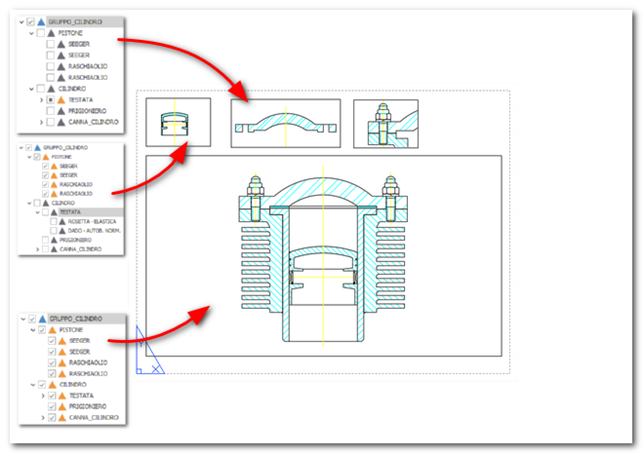
This mode lets you create detailed views by turning parts on and off in the context of the viewport. The’turning on or off of parts can be managed through the’ parts tree or through the parts display commands.

All these operations act according to the context. In model space or in layout space (outside a viewport) these commands act on the display of parts in model space. If executed’ inside a viewport they act on the visibility of the parts in the viewport itself.
Note:
A part turned off in modeling space cannot be turned on in a viewport. Only parts turned on globally can have different visibility states in the viewports.
Depending on the theme preferences, the colors of the various texts adapt to improve their readability.
Note:
If a custom background color is used, this logic is not applied; this feature works only in the parts tree of the QS viewer.