Part Locking and Editability
 Part locking mechanism
Locking a part means performing the same operation you would do by locking a layer, and the result obtained is also the same.
When a part is locked, the geometries it contains cannot be modified in any way. This mechanism is very useful to avoid modifying geometries belonging to parts you do not intend to modify.
The TOP application manages in an automatic way thelocking of theparts: through the commandGlobal you can choose between two operating modes of this mechanism. In particular, when this option is active, the unlocking of parts occurs both for the active part and for any children, while when it is disabled only the active part will be unlocked, while all the other parts of the drawing will be locked.
In addition to the automatic locking mechanism, the user is provided with the commands forlocking\unlocking parts arbitrarily, which allow you to set some parts as locked.
 Non-Editable Parts
In addition to the management of part locking, the user is given the possibility to define a part as non-editable.
A part set in this way cannot have any kind of modification at the level of geometry, registry data and of part structure.
When a part is defined as non-editable, the entities that compose it cannot be modified, moved or rotated, as if they were on a locked layer. Furthermore, it will not even be possible to add further entities, either by drawing them directly or by aggregating them.
When a part is made non-editable, its state is automatically reflected on all its subparts, since they are considered an integral part of it. These parts behave differently from the parts from which they inherit the property: from now on, for clarity, we will call them indirectly non-editable parts, or recursively non-editable parts.
Difference between Locked Parts and Non-Editable Parts
- A non-editable part always keeps this characteristic regardless of navigation through the parts.
Therefore, even if the part is activated, it remains non-editable. The concept of active part, on the other hand, cannot coexist with the concept of locked part, since the part is always unlocked when it is activated. - A non-editable part cannot undergo any kind of modification to its content: it is not possible to add orremove geometries to a part of this type with the commandaggregate, whereas these operations are possible on locked parts.
- A non-editable part cannot undergo changes to the part structure derived from it, therefore it is not possible to create new child parts of a non-editable part, or to aggregate other parts to a non-editable part through the commandsaggregate part.
- As already mentioned, a part set as non-editable also passes this characteristic on to any child parts, which therefore become indirectly non-editable parts.
- When a part is indirectly non-editable it is considered a portion of the higher-level part that keeps it locked, so it is not possible to act on it even with the part editing commands, which are instead available both on locked parts and on directly non-editable ones.
- The state of non-editability is saved inside the part, therefore, unlike locking, a part remains non-editable even when it is copied to another position, loaded into another drawing or saved through the dedicated command.
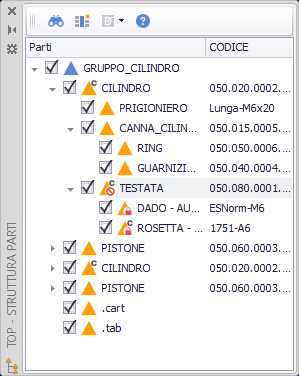
- A non-editable part, whether directly or indirectly, is represented by a dedicated symbol in the parts tree:
In the figure below: - The TESTATA part has been set as non-editable: we can recognize it by the prohibition symbol overlaid on the QS parts icon.
- The parts below it are indirectly non-editable, and are distinguished by the padlock symbol overlaid on the part icon.