Ribbon
The Designer has several sections and commands accessible via buttons on the Ribbon.
The "Editor" section looks like this:
- Package
 New: Create a new Console package (.con) (also available with CTRL+N)
 Load: Load an existing Console package (also available with CTRL+O)
 Save\Salva As: Save the current Console package (also available with CTRL+S, CTRL+SHIFT+S)
 Import: Import a Console package from the previous Excel format
 Password: Allows you to assign a password to the current Console package to prevent it from being modified by unauthorized users.
- Console
- Selector: Allows you to choose the current Console
 : Adds a Console
 : Removes the current Console
 : Determines whether to show a "Library" palette in the current Console
 : Determines whether to show the current Console within the CAD.
- Language
- Selector: Indicates the current language
 : Adds a language
 : Removes a language
- Clipboard
 Copy: Copy the current cell (also available with CTRL+C)
 Cut: Cut the current cell (also available with CTRL+X)
 Paste: Paste the current cell (also available with CTRL+V)
 : Undo the last action performed (also available with CTRL+Z)
 : Redo the last undone action (also available with CTRL+Y)
The "Advanced" section instead:
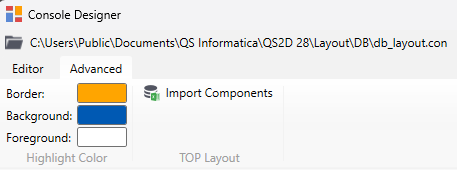
- Highlighting: Indicates the colors that will be used to indicate the last used button in the Console within the CAD
- Border
- Background
- Foreground
- TOP Layout
- Import Components: It allows you to import DB components from Excel in order to associate button commands directly with their insertion.