Topx_PartViewXRef

XRef parts
- What
Shows the part structure of an XRef (for parts) inserted in the drawing.
- Why
Shows the part structure of XRef inserted in the current drawing.
- How
The part structure permits to switch on and off the parts of the external references.
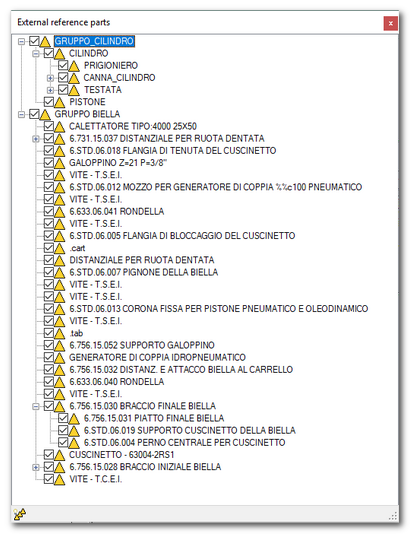
Once started, the command asks to select an XREF or "ALL" for selecting all references in the drawing.
Identified the XREF, TOP extract the part structure from them and it makes a "virtual" part tree that allows to switch on and off the XREF parts.
The command in the state bar permits to switch on all the parts.
MANAGEMENT OF THE XREF ITEMIZED LISTS
TOP itemized list starting from release 21 permits to calculate the itemized list considering the part structures of the external references.
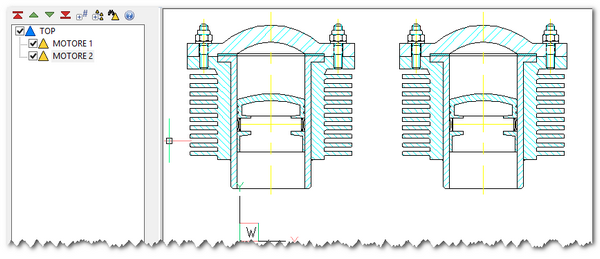
In the example it's considered a drawing where has been inserted two "real" parts MOTORE 1 and MOTORE 2. Inside each part has been inserted the external drawing as XREF. If TOP itemized list command is launched the result is as follow.
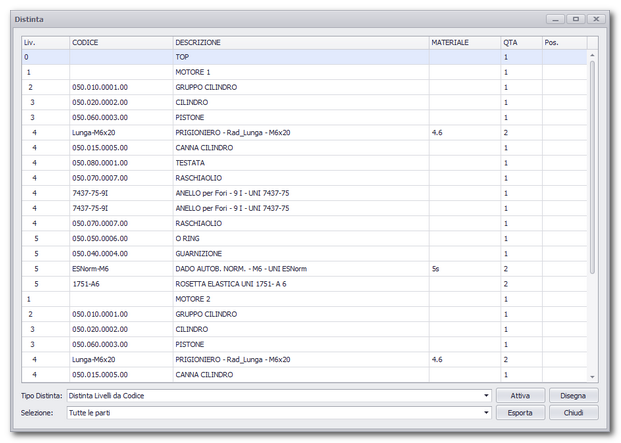
The TOP parts of the drawings are inserted "Daugthers" of the real parts of the current drawing.