Top_Lamiere

Sheets Metal
A useful function to draw sheets metal that can be managed using a simple and intuitive dialogue box.
As for all standard libraries, it is possible to create a part and insert automatically in the material’s slip the parts used.
- What
- Allows to draw the sheets metal with lateral, front or top view.
- Why
- To insert in a drawing a sheets metal, and possibility to create different parts and manage the elements in the material’s BOM.
- How
- A dialogue-box displaying the plate’s main parameters is opened to easily and rapidly draw a sheets metal.
The dialogue-box opened with the command Top_Lamiera is described in the image below.
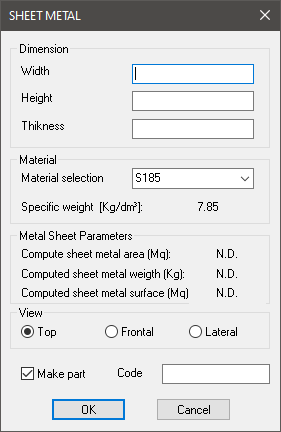
In the sector at the top is displayed a dialogue-box with the plate’s dimensions. It is possible to insert in the drawing the plate’s width, height and the thickness.
Right under there is another dialogue-box to select and insert material. Below are displayed the parameters the application calculates according to the part’s dimensions, and according to the selected material, which are the area, the weight and the surface.
Still under there is the command to select the component's view. And there is the command to create a part, and a dialogue-box to insert the code created according to the plate’s thickness and material.
Once selected all options, set the insertion point and angle and press OK to insert the object in the drawing