Balloning Related Commands
Ballooning Overview
General Description
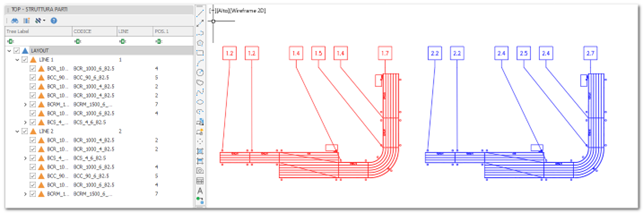
Ballooning generally consists of identifying the parts within a drawing by means of a balloon, i.e., a circle or other geometric shape containing a number or code. A leader line originates from the balloon and points to the corresponding part in the drawing.
In addition to inserting the graphical element, a POS. attribute is automatically populated in the part with the computed sequential number.
POS. Attribute Behavior
The calculation logic of the POS. attribute, as well as the balloon drawing rules and grouping/aggregation criteria, can be configured within the Annotation Style.
The value of the POS. attribute is displayed inside the balloon.
Due to this dual nature—both graphical and data-related—the balloon object must be managed using dedicated ballooning commands. In particular, to remove both the graphical balloon and the associated POS. attribute in a single operation, the commands “Delete Balloon” and/or “Delete All Balloons” must be used.
POS. Mask
It is possible to display additional attributes, beyond POS., inside the balloon block.
This is achieved by defining a Position Mask within the corresponding Annotation Style.
By default, the mask is defined as {POS.}, meaning that only the POS. attribute value is shown within the balloon.
Additional attributes can be included by adding them within curly braces. For example:
{GRUPPO}{POS.}
Additional characters can also be inserted as separators or complementary text between attributes.
Any content not enclosed within curly braces is rendered literally inside the balloon block.
It is also possible to reference an attribute from a higher-level part by prefixing the attribute name with the ^ symbol.
Inheritance of attributes from the parent part applies only if the attribute is not already defined in the current part.
Examples
The figures below illustrate example usages of the described functionality.