top_sort_pall

Reorder the dots
What
Allows you to reorder the ballooning already inserted in the drawing.
Why
In the layout field, it can be useful to mark an assembly with an increasing progressive number based on the position of the parts. Thanks to this command, it becomes possible to mark the drawing normally and then proceed to reorder the numbering. It is also possible to number using an increment step.
How
Once the command is launched, the following dialog will appear:
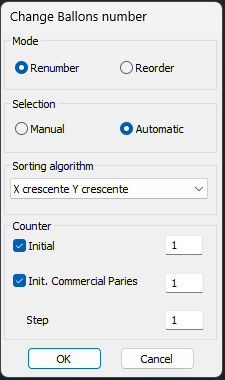
The Renumber option allows you to recalculate the shot peening sequences according to the initial sequence and increment settings.
Selecting the Reorder option and choosing one of the sorting algorithms from the drop-down menu will ask the user to select a set of dots on the screen; this set of dots will be reordered according to the chosen algorithm.
From this dialogue it will also be possible to select the options regarding the progressive of the dots (the initial value of the shot, the initial value of the shot of the commercial parts and the value by which the dots increase) and the selection mode of the dots.
If Manual mode is selected , the user, after having given OK, will select which dot to associate which number with, always based on the progressive options entered.
In the case of Automatic mode , however, the dots will be reordered according to the chosen sorting algorithm.